Autogen Studio
Visual interface for building and testing multi-agent workflows using Microsoft's AutoGen framework.
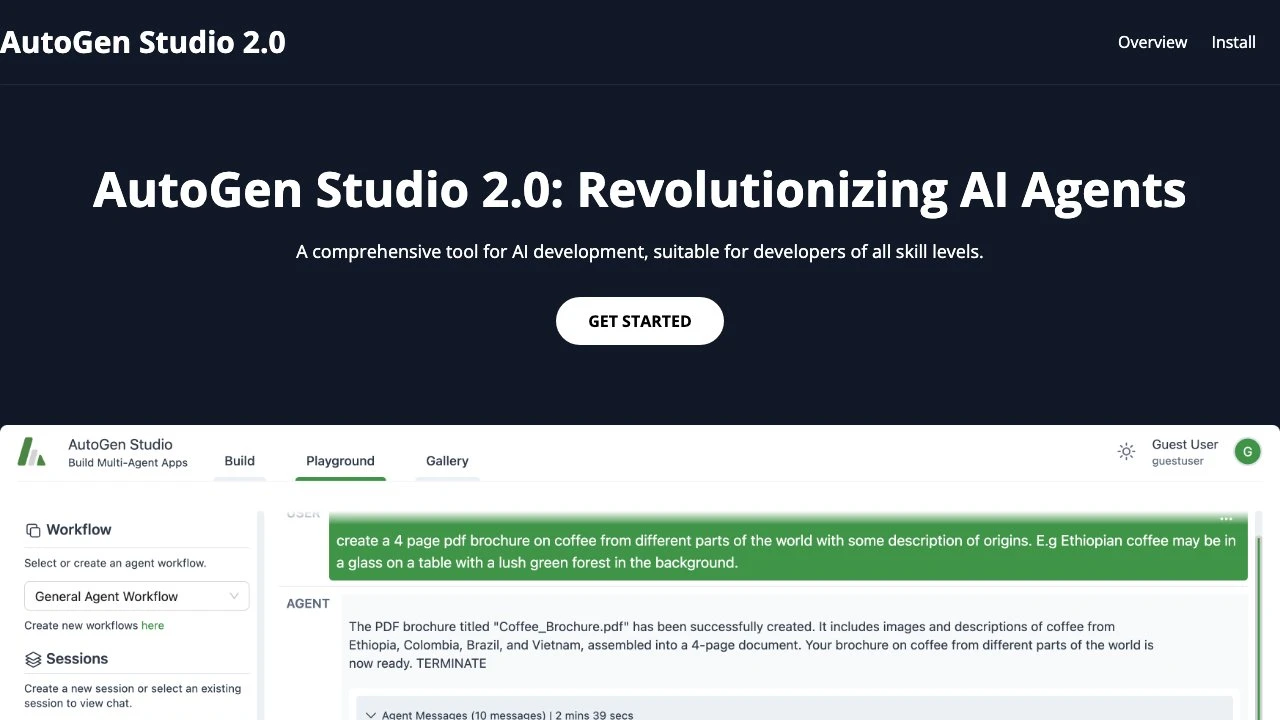
AutoGen Studio 2.0 is a visual development environment built on top of Microsoft's AutoGen framework, designed to make multi-agent AI workflows accessible without requiring deep programming expertise. It provides a graphical interface for constructing, configuring, and testing systems where multiple AI agents collaborate to complete tasks.
At its core, AutoGen Studio translates the complexity of the AutoGen Python framework into a point-and-click experience. Users can define agents with specific roles and capabilities, assign skills, connect them into workflows, and observe their behavior in real time — all without writing orchestration code from scratch. For developers who do want lower-level control, the platform exposes a Python API that mirrors the visual workflow builder.
The interface is organized into three main sections. The Build section is where agents are created, skills are defined, and workflows are assembled. Users configure which language model each agent uses (OpenAI or Azure OpenAI), set behavioral parameters, and wire agents together into collaborative pipelines. The Playground section provides a live testing environment where users can run workflows, observe agent-to-agent communication, and validate behavior before deployment. The Gallery section acts as a session archive, storing past development runs for reference and reuse.
AutoGen Studio sits in a growing category of no-code or low-code multi-agent builders. Compared to alternatives like CrewAI's interface tools or LangGraph Studio, AutoGen Studio benefits from direct Microsoft backing and tight integration with the AutoGen framework — which has strong community adoption and research provenance. However, it requires Python and Anaconda setup at the environment level, which raises the barrier slightly compared to fully browser-based tools like Flowise or Botpress. It is less opinionated than CrewAI but also less mature than production-grade orchestration platforms.
The tool is particularly well-suited for prototyping and experimentation. Researchers exploring agent collaboration patterns, developers evaluating whether multi-agent architectures fit their use case, and teams building internal automation tools will find AutoGen Studio a practical starting point. It reduces the feedback loop between designing an agent system and seeing it run, which is valuable in early-stage development.
Because AutoGen Studio is open source and maintained by Microsoft, it benefits from active development and community contributions. Planned future enhancements include advanced workflow types and further usability improvements, suggesting the platform will continue to mature alongside the broader AutoGen ecosystem.
Key Features
- Visual agent builder for creating and configuring AI agents without writing orchestration code
- Workflow setup interface that connects multiple agents into collaborative pipelines
- Integrated language model configuration supporting OpenAI and Azure OpenAI API keys
- Playground section for live testing and observation of multi-agent behavior
- Gallery section that archives development sessions for future reference and reuse
- Python API for developers who need programmatic control beyond the visual interface
- Built on Microsoft's AutoGen framework, with access to its full agent collaboration capabilities
Pros & Cons
Pros
- Lowers the barrier to building multi-agent systems for users without deep Python expertise
- Backed by Microsoft with active development and a strong open-source community
- Combines a visual interface with a full Python API, accommodating both no-code and code-first workflows
- Playground environment enables rapid iteration and real-time observation of agent behavior
- Gallery feature supports reuse and documentation of previous development sessions
Cons
- Still requires local Python and Anaconda installation, which adds setup complexity compared to fully browser-based tools
- Dependent on external LLM API keys (OpenAI or Azure), adding cost and configuration overhead
- Less mature for production deployments compared to more established orchestration platforms
- Advanced workflow types are listed as upcoming features, indicating current capability gaps
Pricing
Visit the official website for current pricing details.
Who Is This For?
AutoGen Studio is best suited for developers, researchers, and technical teams exploring multi-agent AI architectures who want to prototype and test workflows without writing full orchestration code. It is particularly valuable for those already familiar with or invested in the Microsoft AutoGen ecosystem who want a faster feedback loop during development.

Similar to Autogen Studio